Thursday, 5 September 2024

Difference Between OTBI and BI Publisher

Difference Between OTBI and BI Publisher

OTBI

BI Publisher

+ Drop and Drag Interface/No SQL Needed

-More Technical/SQL Needed

+ Presentation Layer Developed so user does not need to join different tables together

-Thousand of Tables, multiple joins needed

+ Subject Area fields are intuitive

-Table name, fields, joins are not intuitive, and documentation can be vague

+ Reports can be built relatively quickly and updated rather quickly

-Reports can take very long to build, very complex, difficult to update

+ Oracle investing heavily in this type of reporting so additional fields will continuously be added

-OTBI is the Oracle preferred way of getting at data if possible.

+ As more and more clients adopt Cloud, more and more reporting resources will be available

+ As more and more clients adopt Cloud, more and more reporting resources will be available

 -+ Viewing results is limited by use security

-+ Viewing results is not limited by use security

-Not all fields are available in subject areas

+ can get at almost all needed information

-Joining subject area is not always possible and you may have requirements from multiple subject areas.  

+ Joins may be complicated, but joining multiple tables can be done to get all required fields

-Data is subject areas can be misleading, drop and drag interface can make subject areas/data seems simpler than actuality and no visibility how data is actually retrieved from database.

+ Once SQL is mastered, creating datasets and modifying past data sets can be easy.


Tuesday, 3 September 2024

Difference Between SOAP & REST


Difference Between SOAP & REST


SOAP

REST

Stands for 

Simple Object Access Protocol

Representational State Transfer

What is it?

SOAP is a protocol for communication between applications

REST is an architecture style for designing communication interfaces.

Design

SOAP API exposes the operation.

REST API exposes the data.

Transport Protocol

SOAP is independent and can work with any transport protocol.

REST works only with HTTPS.

Data format

SOAP supports only XML data exchange.

REST supports XML, JSON, plain text, HTML.

Performance

SOAP messages are larger, which makes communication slower.

REST has faster performance due to smaller messages and caching support.

Scalability

SOAP is difficult to scale. The server maintains state by storing all previous messages exchanged with a client.

REST is easy to scale. It’s stateless, so every message is processed independently of previous messages.

Security

SOAP supports encryption with additional overheads.

REST supports encryption without affecting performance.

Use case

SOAP is useful in legacy applications and private APIs.

REST is useful in modern applications and public APIs.

Wednesday, 30 January 2019

Query to find general ledger PTD,YTD Account balance in Oracle APPS


Query to find general ledger PTD,YTD Account balance in Oracle APPS

SELECT glb.SET_OF_BOOKS_ID,
  glb.CURRENCY_CODE,
  glb.PERIOD_NAME,
  glb.period_year,
  glb.BEGIN_BALANCE_CR,
  glb.BEGIN_BALANCE_DR,
  gcc.segment1
  ||'.'
  ||gcc.segment2
  ||'.'
  ||gcc.segment3
  ||'.'
  ||gcc.segment4
  ||'.'
  ||gcc.segment5
  ||'.'
  ||gcc.segment6
  ||'.'
  ||gcc.segment7,
   (glb.period_net_dr             - glb.period_net_cr) PTD,
  (NVL (glb.BEGIN_BALANCE_DR, 0) - NVL (glb.BEGIN_BALANCE_CR, 0)) + (NVL (glb.PERIOD_NET_DR, 0) - NVL (glb.PERIOD_NET_CR, 0)) YTD
FROM apps.gl_balances glb,
  apps.gl_code_combinations gcc
WHERE gcc.code_combination_id = glb.code_combination_id
AND glb.actual_flag           = 'A'
AND glb.period_name           = 'JAN-19';
AND glb.code_combination_id   = 1739;

Wednesday, 25 October 2017

Materialized View (MV)

           Materialized View (MV)
                 ---------------------------------

The Materialized View is a non-editioned object type, and therefore a
materialized view cannot directly reference editioned objects. To avoid this
limitation, Oracle E-Business Suite Online Patching technology implements a new
Effectively Editioned Materialized View compound object. Application developers
create and maintain the Materialized View Definition (query) in an ordinary
view. The Online Patching technology then automatically maintains a
corresponding Materialized View Implementation that is legal for editioned
databases.
MV Definition Standards:
A Materialized View Name must be unique within the first 29 bytes.
A Materialized View Definition must be stored in an ordinary view
called MV_NAME||'#'.
Create or replace the Materialized View Definition as an ordinary view
calledmv_name||'#'.
Test the MV Definition for accuracy before generating the MV
Implementation.
For example:
create or replace view FND_EXAMPLE_MV# as select ... ;
select * from fnd_example_mv#;
The Materialized View Implementation is automatically generated from the MV
Definition using the AD_ZD_MVIEW.UPGRADE procedure.
The syntax is exec ad_zd_mview.upgrade(, )
Do not attempt to directly create or replace the Materialized View
Implementation Query. To recreate an MV Implementation, call the
AD_ZD_MVIEW.UPGRADE procedure.
A Materialized View Definition must specify a column alias for each item in
the select list.
Failure to specify a column alias may cause the error
ORA-00998 "must name this expression with a column alias"
Example: change select sum(EMP.SALARY), ...
to select sum(EMP.SALARY) SUM_EMP_SALARY, ...
A Materialized View Query must not reference editioned PL/SQL functions.
If the MV definition references an editioned PL/SQL function, the MV
Implementation will fail to generate and the MV will be unusable.
For examples of replacing PL/SQL function calls with equivalent SQL in
Materialized Views, see: Examples of SQL Replacements for PL/SQL
Functions
A Materialized View should use 'REFRESH FORCE' instead of 'REFRESH
FAST'. The 'FORCE' option allows the MV to fall back to using a complete
refresh in situations where the fast refresh is not possible.
See: Oracle Database SQL Language Reference 11g Release 2 (11.2) for more
information on the "REFRESH FORCE" option.
If the MV Implementation content must be automatically refreshed after
patching, include the '/*AUTOREFRESH*/' comment tag in the MV Definition
query.
Do not specify the /*AUTOREFRESH*/ tag for large MVs that will take a
long time to refresh. For these cases use a concurrent program to
refresh the MV after patching cutover.
Example: create or replace view FND_EXAMPLE_MV# as select
/*AUTOREFRESH*/ ... ;
MV Usage Standards:
Do not assume that Fast Refresh is always possible. After an online patch,
Complete Refresh may be required. When refreshing a Materialized View, us
the 'FORCE' clause instead of 'FAST'.
See: Oracle Database SQL Language Reference 11g Release 2 (11.2) for more
information on the 'FORCE' option.
MV Dynamic DDL Standards:
Use AD_MV to execute Dynamic DDL for materialized views. Here is an
example of creating a materialized view using the AD_MV package:
--
-- Code Example: Create a materialized view using AD_MV interface.
--
-- Note:
-- when executed in the Run Edition, the MV is created immediately.
-- when executed in the Patch Edition, the MV is generated at CUTOVER.
--

begin
-- Create MV
ad_mv.create_mv('FND_EXAMPLE_MV',
'create materialized view FND_EXAMPLE_MV '||
' tablespace '||ad_mv.g_mv_data_tablespace||' '||
' build deferred refresh on demand as '||
'select /*AUTOREFRESH*/ '||
' upper(oracle_username) USERNAME '||
' , decode(read_only_flag,''C'',''pub'',''E'',''applsys'',''U'',''apps'')
USERTYPE '||
'from fnd_oracle_userid '||
'where read_only_flag in (''C'',''E'',''U'') ');
end;
-- End of Code Example.

MV Online Patching Compliance Standards:
Deliver Materialized View using XDF. (GSCC File.Sql.82)
Do not drop an existing materialized view until the Cleanup phase of patch
execution.
Do not attempt to upgrade, refresh or access a Materialized View
Implementation in the Patch Edition. Although the MV implementation is
visible to the Patch Edition, it continues to implement the Run Edition of
the definition until the cutover phase. MV implementations are
automatically regenerated as needed at the cutover phase.
If an online patch must manually refresh the MV Implementation
contents, submit a concurrent request to do the refresh. The concurrent
request will be run after cutover and therefore after the MV
implementation has been regenerated.
If the MV Definition specifies the /*AUTOREFRESH*/ comment tag, then
the MV Contents will be automatically refreshed whenever the MV
implementation is regenerated.
Do not drop an obsolete materialized view until the Cleanup phase of patch
execution.
For more information on materialized views, see: Oracle Database Concepts 11g
Release 2 (11.2).
For more information on using XDF (XML Definition File) features, see:
XML Definition File Utility.

Examples of SQL Replacements for PL/SQL Functions
-------------------------------------------------
To "Editions-enable" the APPS schema, non-Editionable objects must not depend
on Editionable objects (NE !-> E). To meet this requirement, the database
object development standards specify that Materialized Views (Materialized
Views, or MVs, are non-Editionable) must not call PL/SQL functions (which are
Editionable).
The examples below demonstrate how to replace frequently- used Oracle
Applications Technology PL/SQL function calls with an equivalent SQL in
Materialized Views. You may continue to call built-in PL/SQL functions such as
"upper()". fnd_profile.value() replaced with a SQL sub-select:
Before:
fnd_profile.value('MSC_HUB_REGION_INSTANCE')
After:
(select profile_option_value
from fnd_profile_option_values
where level_id = 10001
and (profile_option_id, application_id) =
(select profile_option_id, application_id
from fnd_profile_options
where profile_option_name = 'MSC_HUB_REGION_INSTANCE'))
Notes:
This replacement is valid ONLY in a Materialized View. For other uses of
fnd_profile.value(), continue using the normal PL/SQL call.
The general case for fetching profile option values is very complex, that
is why there is a PL/SQL package dedicated to doing it. But materialized
views results have to be valid in any context, so profile options
referenced in materialized views should only have site-level values, and
the replacement SQL only needs to support fetching the site level value.
This replacement SQL will only use the profile option value set at the site
level.
fnd_message.get_string() replaced with a SQL sub-select
Before:
fnd_message.get_string('MSC','MSC_HUB_UNASSIGNED')
After:
(select substrb(REPLACE(message_text, '&&', '&'),1,2000)
from fnd_new_messages m, fnd_application a
where m.message_name = 'MSC_HUB_UNASSIGNED'
and m.language_code = 'US'
and a.application_short_name = 'MSC'
and m.application_id = a.application_id)
Notes:
This replacement is valid ONLY in a Materialized View. For other uses of
fnd_message.get_string(), continue using the normal PL/SQL call.
This replacement SQL will only retrieve the US language message text and is
not sensitive to any session language settings.
MV queries cannot contain a sub-SELECT within the main SELECT clause;
therefore, the replacement SQL is a bit trickier if the function call was
used in the MV SELECT clause.
Before:
select fnd_message.get_string('FND', 'CANCEL')
from dual
where 1=1
/
After:
select fmgs.result
from dual
, (select substrb(REPLACE(message_text, '&&', '&'),1,2000) result
from fnd_new_messages m, fnd_application a
where m.message_name = 'CANCEL'
and m.language_code = 'US'
and a.application_short_name = 'FND'
and m.application_id = a.application_id) fmgs
where 1=1
/
fnd_global.lookup_security_group() replaced with a SQL sub-select
Before:
fnd_global.lookup_security_group('INTEREST_STATUS', 279)
After:
(select nvl(max(lt.security_group_id), 0)
from fnd_lookup_types lt
where lt.view_application_id = 279
and lt.lookup_type = 'INTEREST_STATUS'
and lt.security_group_id in (
0,
to_number(decode(substrb(userenv('CLIENT_INFO'),55,1),
' ', '0',
null, '0',
substrb(userenv('CLIENT_INFO'),55,10)))))
Note: This replacement is valid ONLY in a Materialized View. For other uses of
fnd_global.security_group(), continue using the normal PL/SQL call.
Example of a Deferred Drop
Here is a code example of a deferred drop. This example is for a table:
REM dbdrv: sql ~PROD ~PATH ~FILE \
REM dbdrv: none none none sqlplus &phase=last \
REM dbdrv: checkfile:~PROD:~PATH:~FILE &un_fnd
-- Example logic to drop a table under online patching
--
-- Note: This script drops example table "APPLSYS.FND_EXAMPLE_TABLE".
-- To use this logic for another table, you must substitute "&un_fnd" with the
-- actual table owner token ("&un_"), and
-- "FND_EXAMPLE_TABLE" with the actual table name.
--
-- Usage
-- @TABLE_DROP_SCRIPT
drop synonym FND_EXAMPLE_TABLE;
drop view &1..FND_EXAMPLE_TABLE#;
exec ad_zd.load_ddl('CLEANUP', 'drop table &1..FND_EXAMPLE_TABLE')

Thursday, 21 September 2017

APLIST for an invoice using oracle Diagnostic tool

APLIST for an invoice using oracle Diagnostic tool
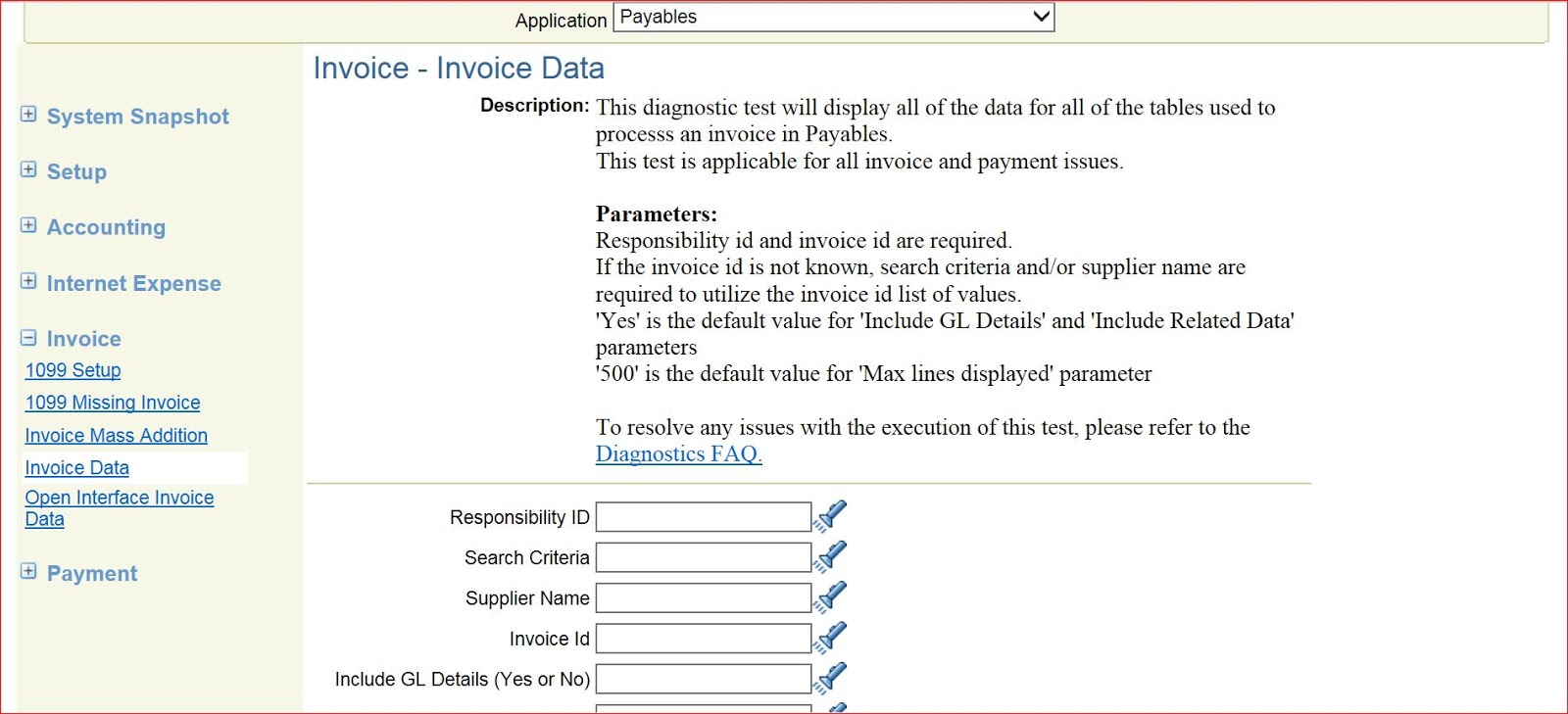
  Navigation -- Oracle Diagnostic Tool

Select application -- Payables

  Advance tab > Invoice > Invoice Data
Please enter the Responsbility_id , Search criteria (Invoice or Check) , Supplier Name, Invoice Id , Include GL Details and Include Related Data. Click on Run Test
 Below you can able to see the Results. Click on Report and then you can print/save the result file.


When the invoice Approval status is Not Required or Initiated Payables > Setup > Options > Payables


WFAPPROVAL_STATUS Types
NOT REQUIRED = When the Invoice Approval is not required (Use Invoice
Approval Workflow option On Invoice Tab of Payables Options is set to no)
REQUIRED = When the Invoice Approval is required (Use Invoice Approval
Workflow option On Invoice Tab of Payables Options is set to Yes)
INITIATED = When the Invoice Approval is required and the user initiates the
Approval Process (submits the invoice for the approval to the approver)
REJECTED = when the Approver rejects the Invoice
WFAPPROVED = when the Approver Approves the Invoice
MANUALLY APPROVED = when the user forcefully approves the Invoice without
submitting it to the approver for the approval.( (Allow Force Approval
option On Invoice Tab of Payables Options is set to Yes)


Question 1 if "Use Invoice Approval Workflow " option On Invoice Tab is set
to YES that means it is applicable for all the invoices then why database is
having wf_approval_status is 'Not required' for some invoices and
'WFAPPROVED' for some invoices?
Answer :- I can tell you give you the following reasons (there can be other
reasons too)
1. There can be a possibility that the ""Use Invoice Approval Workflow"
was set to NO earlier and the invoices are uploaded/ entered. But after that
some one has set this option to YES and uploaded/ entered the invoices or
the vice-versa. That is why some invoices have not required status.
2. The invoices are uploaded/ entered through two different
responsibilities which have different Operating unit. For one responsibility
this option is set to Yes and for another is it set to NO. (Please compare
the Org_id and the Responsibility_id)

Another Solution
APINV workflow customized if invoice matched to PO then wfapproval_status will be "NOT REQUIRED" and 
if invoice is not matched to PO then wfapproval_status will be "INITIATED".


/* Procedure:  iaw_po_check
  * Purpose: This procedure is a copy of AP_WFAPPROVAL_PKG.iaw_po_check.  It has been modified to change the logic so that any invoice with even one line associated with a PO will not require apporval.
 */
   PROCEDURE iaw_po_check (
      itemtype    IN              VARCHAR2,
      itemkey     IN              VARCHAR2,
      actid       IN              NUMBER,
      funcmode    IN              VARCHAR2,
      resultout   OUT NOCOPY      VARCHAR2
   )
   IS
      l_po_count            NUMBER;
      l_check_po_match      VARCHAR2 (3);
      l_org_id              NUMBER;
      l_debug               VARCHAR2 (240);
      l_api_name   CONSTANT VARCHAR2 (100)  := 'iaw_po_check';
      l_debug_info          VARCHAR2 (500);
      l_temp_invoice_id     NUMBER (15);                       -- Bug 5037108
      l_error_message       VARCHAR2 (2000);                   -- Bug 5037108
   BEGIN
      IF (g_level_procedure >= g_current_runtime_level)
      THEN
         fnd_log.STRING (g_level_procedure,
                         g_module_name || l_api_name,
                         'AP_WFAPPROVAL_PKG.iaw_po_check (+)'
                        );
      END IF;

--check 'Approve PO Matched' flag here
      l_check_po_match :=
                   wf_engine.getitemattrtext (itemtype, itemkey, 'APINV_AAPO');

             --we need to get the org_id until I can change the raise event
      --in the invoice workbench
      SELECT org_id
        INTO l_org_id
        FROM ap_invoices_all
       WHERE invoice_id = SUBSTR (itemkey, 1, INSTR (itemkey, '_') - 1);

      -- lets go ahead and set the wf attribute
      wf_engine.setitemattrnumber (itemtype, itemkey, 'APINV_AOI', l_org_id);
      --Now set the environment
      fnd_client_info.set_org_context (l_org_id);

      IF l_check_po_match = 'Y'
      THEN
         -- bug 2689116 Recoverable tax lines does not have po information
         -- populated on it. Added this check to the select statement.
         SELECT COUNT (invoice_distribution_id)
           INTO l_po_count
           FROM ap_invoice_distributions
          WHERE po_distribution_id IS NOT NULL
            AND invoice_id = SUBSTR (itemkey, 1, INSTR (itemkey, '_') - 1);

         IF NVL (l_po_count, 0) > 0
         THEN
            resultout := wf_engine.eng_completed || ':' || 'Y';

                         --update invoice status
            -- Bug 5037108 starts
            BEGIN
               SELECT     invoice_id
                     INTO l_temp_invoice_id
                     FROM ap_invoices
                    WHERE invoice_id =
                                  SUBSTR (itemkey, 1, INSTR (itemkey, '_') - 1)
                      AND wfapproval_status <> 'MANUALLY APPROVED'
               FOR UPDATE NOWAIT;
            EXCEPTION
               WHEN OTHERS
               THEN
                  l_debug_info := 'Invoice is in lock. Please try later';
                  fnd_message.set_name ('SQLAP',
                                        'AP_CARD_VERIFY_LOCK_FAILED');
                  l_error_message := fnd_message.get;
                  app_exception.raise_exception;
            END;

            -- Bug 5037108 Ends
            UPDATE ap_invoices
               SET wfapproval_status = 'NOT REQUIRED'
             WHERE invoice_id = SUBSTR (itemkey, 1, INSTR (itemkey, '_') - 1)
               AND wfapproval_status <> 'MANUALLY APPROVED';
         ELSE
            resultout := wf_engine.eng_completed || ':' || 'N';
         END IF;
      ELSE
         resultout := wf_engine.eng_completed || ':' || 'N';
      END IF;

      wf_engine.setitemattrtext (itemtype, itemkey, 'APINV_ADB', l_debug);
   EXCEPTION
      WHEN fnd_api.g_exc_error
      THEN
         wf_core.CONTEXT ('APINV',
                          'SELECT_APPROVER',
                          itemtype,
                          itemkey,
                          TO_CHAR (actid),
                          funcmode
                         );
         RAISE;
      WHEN fnd_api.g_exc_unexpected_error
      THEN
         wf_core.CONTEXT ('APINV',
                          'SELECT_APPROVER',
                          itemtype,
                          itemkey,
                          TO_CHAR (actid),
                          funcmode
                         );
         RAISE;
      WHEN OTHERS
      THEN
         wf_core.CONTEXT ('APINV',
                          'SELECT_APPROVER',
                          itemtype,
                          itemkey,
                          TO_CHAR (actid),
                          funcmode
                         );
         RAISE;
   END iaw_po_check;